> ## Documentation Index
> Fetch the complete documentation index at: https://docs.superjoin.ai/llms.txt
> Use this file to discover all available pages before exploring further.
# How to Acquire Airtable Credentials?
> Proceed with the outlined steps to acquire Airtable credentials.
## Step-by-step walkthrough: How to obtain Airtable API Keys
Go to [https://airtable.com/create/tokens](https://airtable.com/create/tokens) to create new token.
 Add following scopes: data.records:read, data.recordComments:read, schema.bases:read
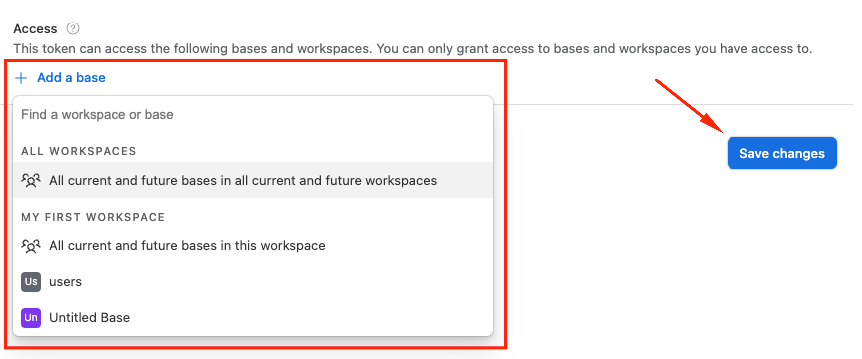
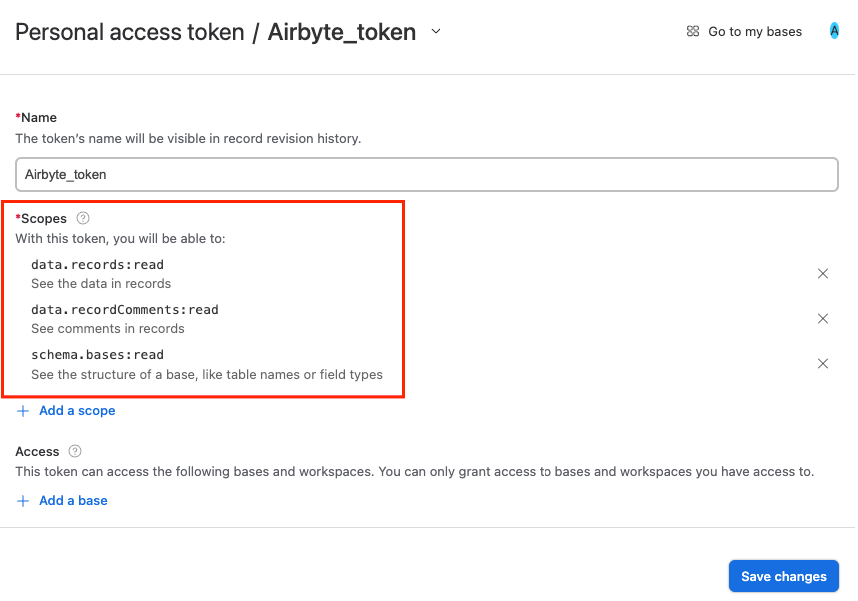 Select required bases or allow access to all available and press the Create Token button.
 Save token from the popup window.
For more details, use Airtable Documentation: [https://airtable.com/developers/web/guides/personal-access-tokens](https://airtable.com/developers/web/guides/personal-access-tokens)
## Setting up Airtable
Head over to the Airtables Overview page to get a step by step guide to connect.
Save token from the popup window.
For more details, use Airtable Documentation: [https://airtable.com/developers/web/guides/personal-access-tokens](https://airtable.com/developers/web/guides/personal-access-tokens)
## Setting up Airtable
Head over to the Airtables Overview page to get a step by step guide to connect.