> ## Documentation Index
> Fetch the complete documentation index at: https://docs.superjoin.ai/llms.txt
> Use this file to discover all available pages before exploring further.
# How to acquire Monday Credentials?
> Proceed with the outlined steps to acquire Monday credentials.
## Step-by-step walkthrough: How to obtain Monday API token
Log into your monday.com account and click on your avatar in the top right corner
Select Developer. This will open the Developer Center in another tab.
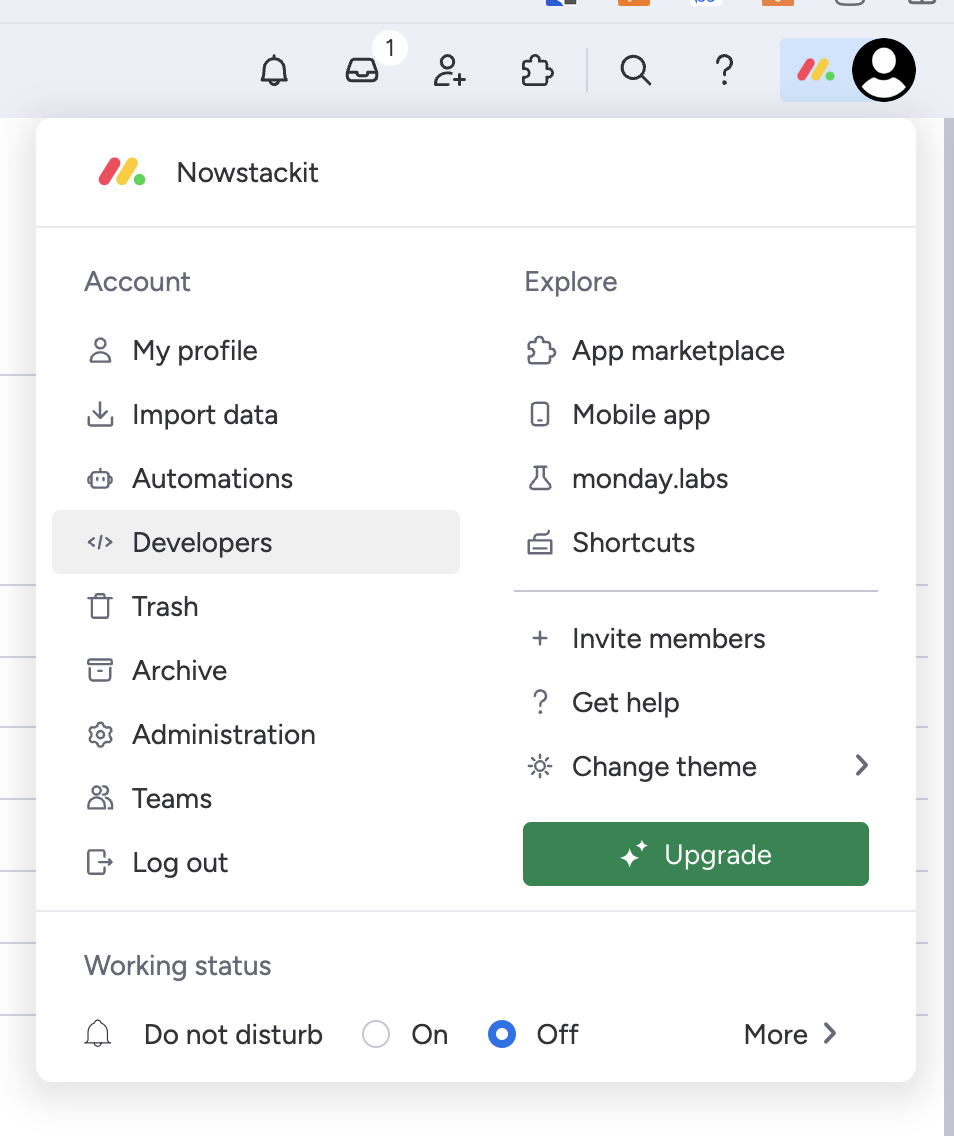 Click `Developer` > `My Access Tokens` > `Show`
 Copy your personal token. Please note that you can always regenerate a new token, but doing so will cause any previous tokens to expire.
For more details, use Monday.com Documentation: [https://developer.monday.com/api-reference/docs/authentication](https://developer.monday.com/api-reference/docs/authentication)
## Setting up Monday
Head over to the Monday Overview page to get a step by step guide to connect.
Copy your personal token. Please note that you can always regenerate a new token, but doing so will cause any previous tokens to expire.
For more details, use Monday.com Documentation: [https://developer.monday.com/api-reference/docs/authentication](https://developer.monday.com/api-reference/docs/authentication)
## Setting up Monday
Head over to the Monday Overview page to get a step by step guide to connect.