> ## Documentation Index
> Fetch the complete documentation index at: https://docs.superjoin.ai/llms.txt
> Use this file to discover all available pages before exploring further.

# How to get Stripe API key?

> Here are the steps to acquire API key from Stripe.

## Step-by-step walkthrough: How to get Stripe API Key

<Steps titleSize="h3">
  <Step title="Go to Stripe Dashboard">
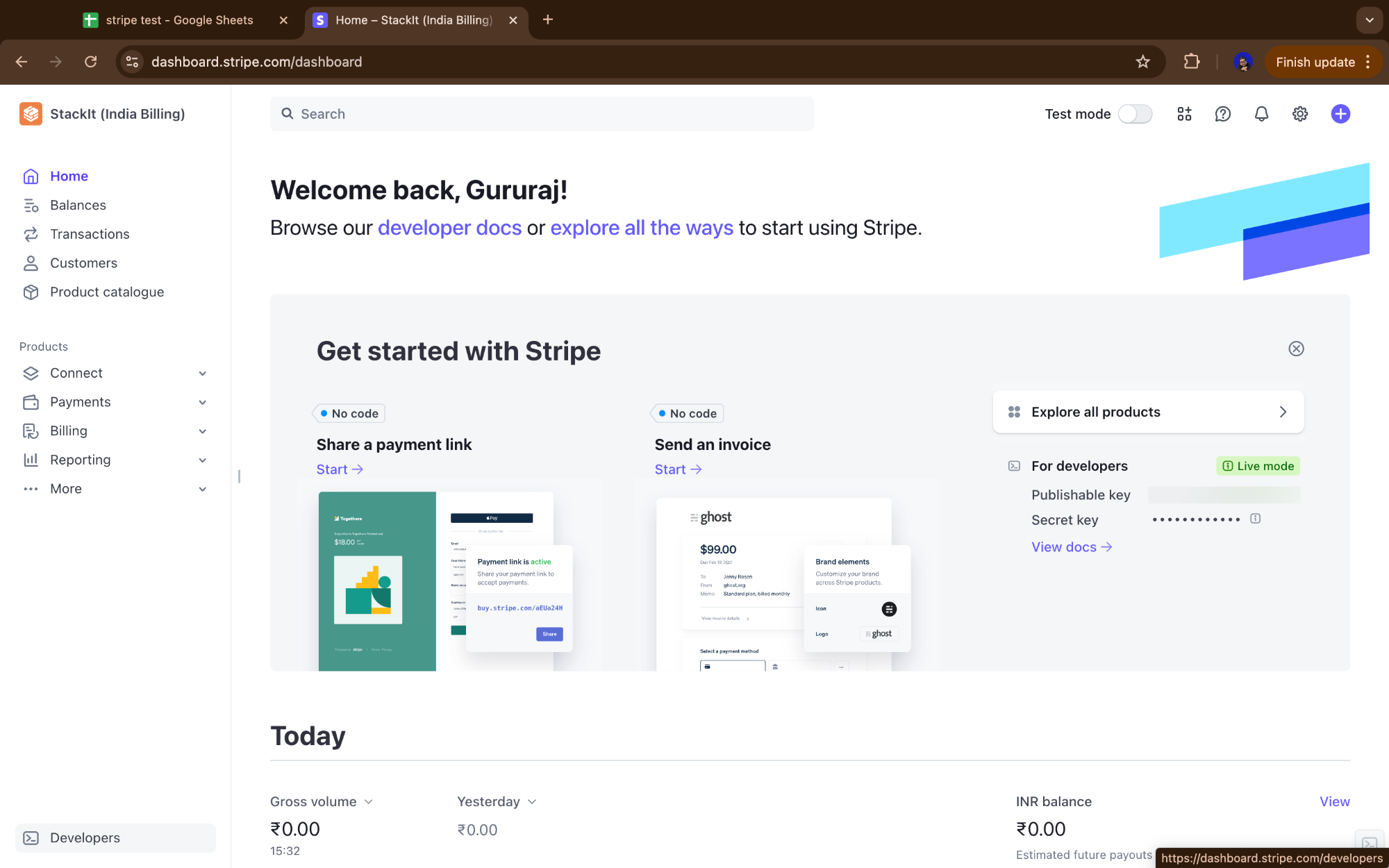
    Click `Developers` in the bottom left corner in Stripe Dashboard Page.

    <Frame>
      <img src="https://mintcdn.com/superjoin/ko3_UmqC3SF-ISko/images/stripe/stripe_key1.png?fit=max&auto=format&n=ko3_UmqC3SF-ISko&q=85&s=827a4a0c8825c7a77a84565e355f9c4b" width="2000" height="1250" data-path="images/stripe/stripe_key1.png" />
    </Frame>
  </Step>

  <Step title="Go to API Keys">
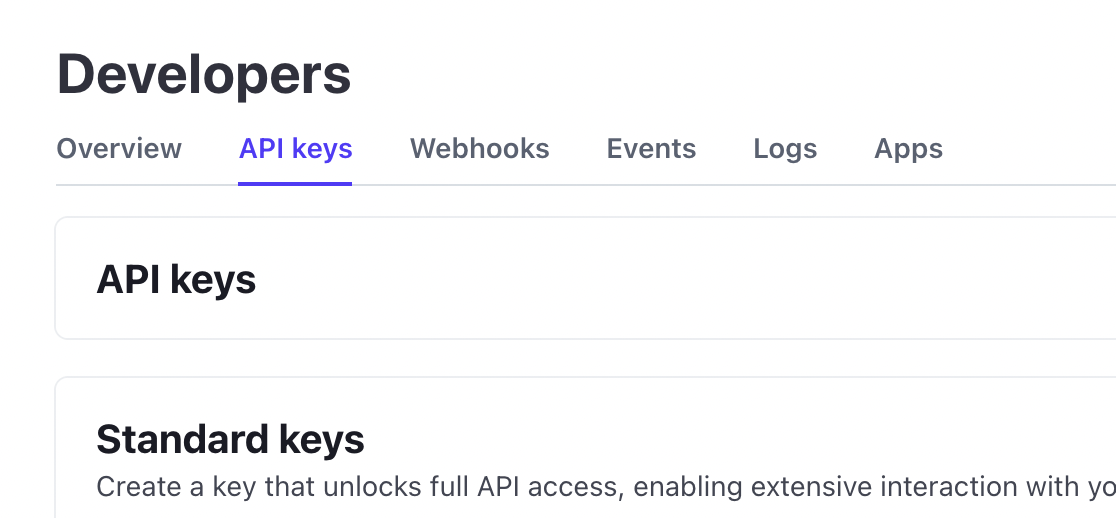
    In the top-left corner, click API keys.

    <Frame>
      <img src="https://assets.superjoin.ai/images/stripe/stripe-s2.png" />
    </Frame>
  </Step>

  <Step title="Click restricted key">
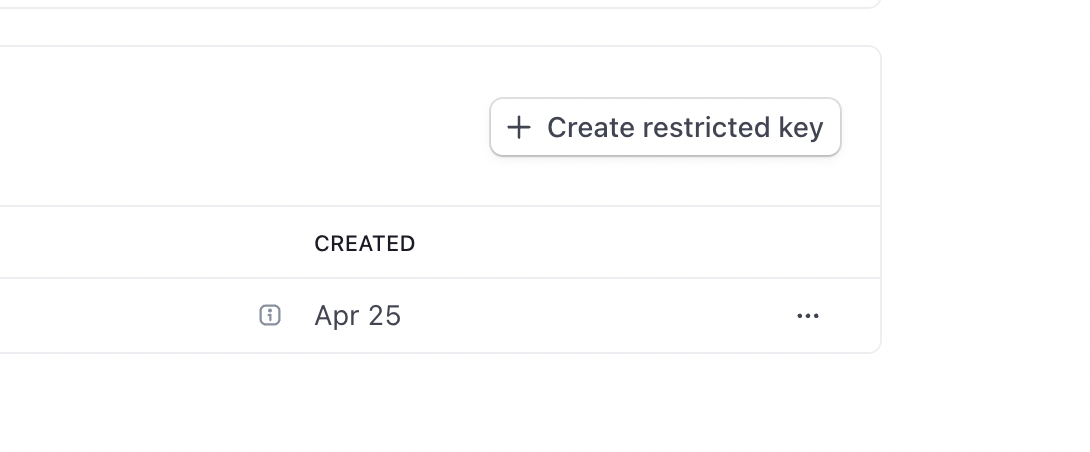
    Click on the "+ Create restricted key" button.

    <Frame>
      <img src="https://assets.superjoin.ai/images/stripe/stripe-s3.png" />
    </Frame>
  </Step>

  <Step title="Give Third Party Access">
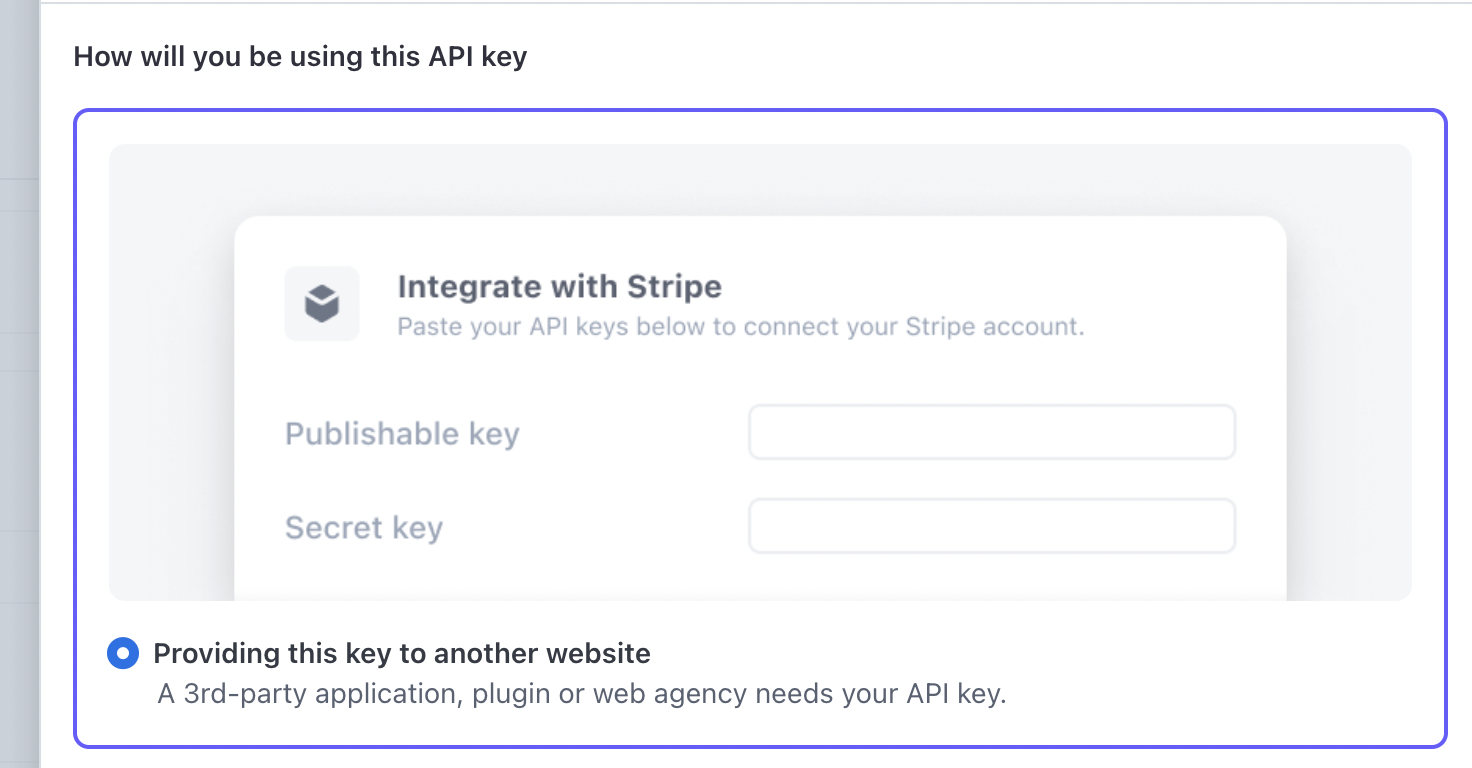
    Select 3rd party access and click on Continue.

    <Frame>
      <img src="https://assets.superjoin.ai/images/stripe/stripe-s5.png" />
    </Frame>
  </Step>

  <Step title="Give Third Party Access">
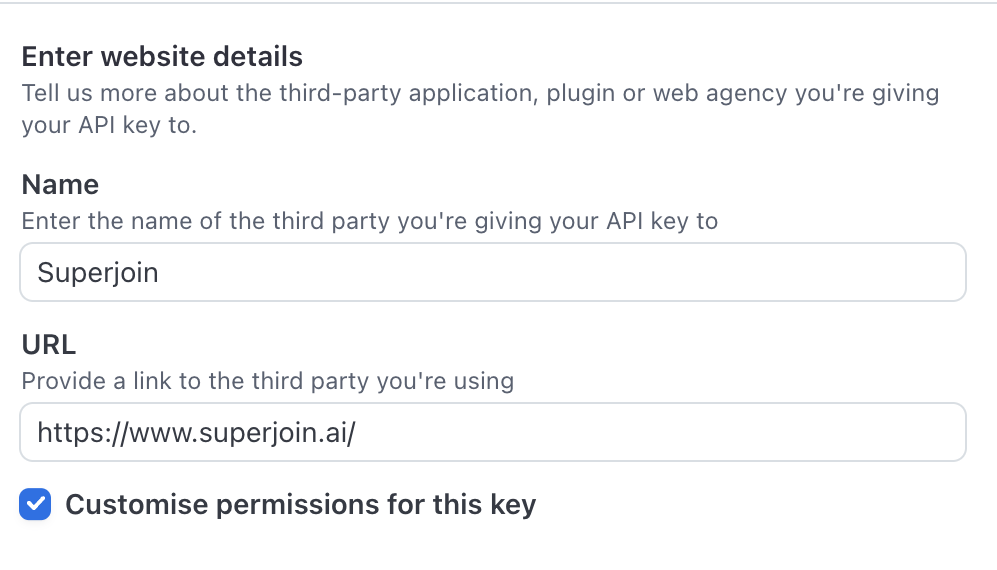
    Enter Superjoin's details and check the "Customise permissions for this key" checkbox and click on "Create Restricted Key".

    <Frame>
      <img src="https://mintcdn.com/superjoin/ko3_UmqC3SF-ISko/images/stripe/stripe_key2.png?fit=max&auto=format&n=ko3_UmqC3SF-ISko&q=85&s=5ad3cee62ec95a9d86ce4153bf7a2897" width="997" height="570" data-path="images/stripe/stripe_key2.png" />
    </Frame>
  </Step>

  <Step title="Set a name for the key and manage the permissions">
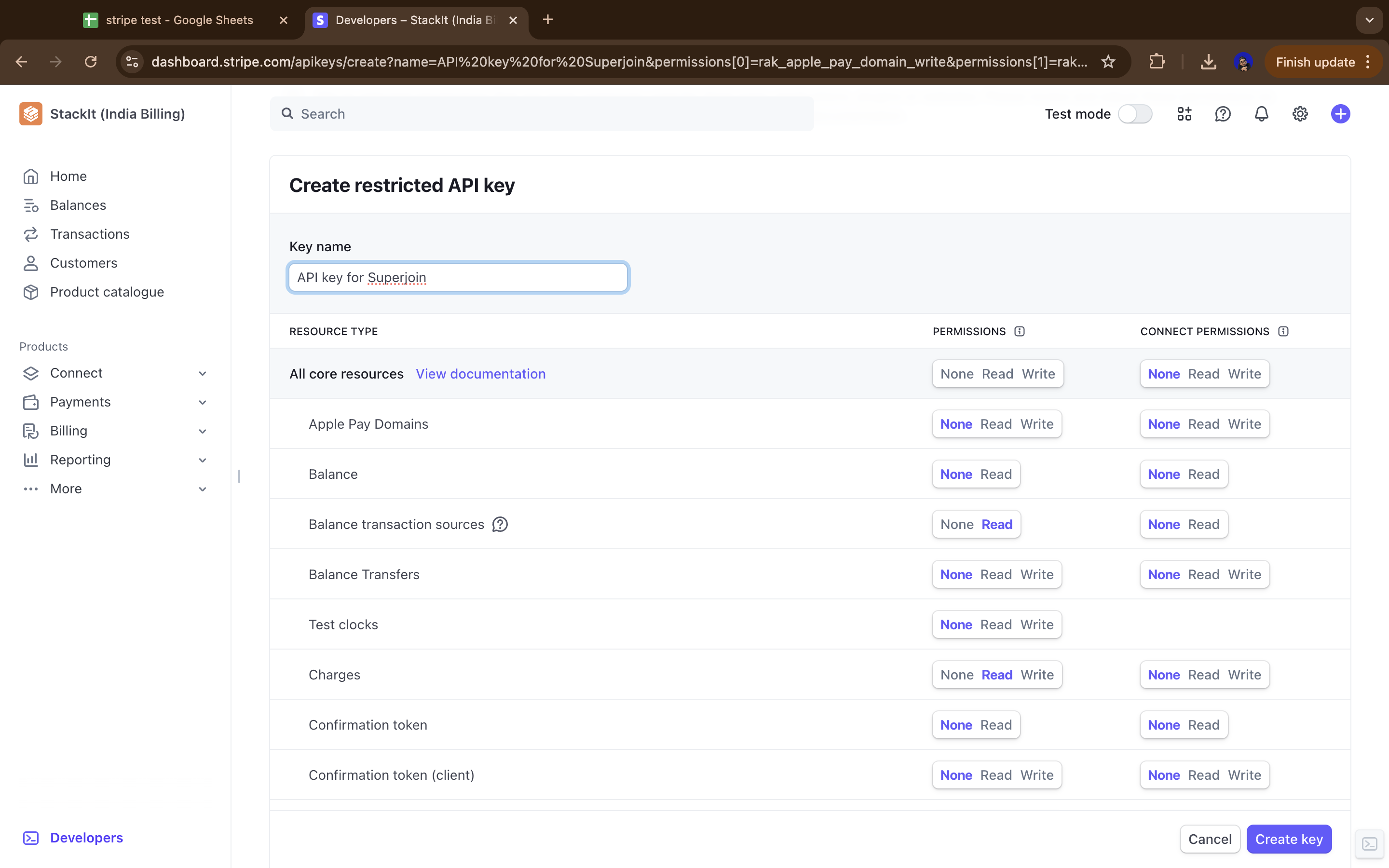
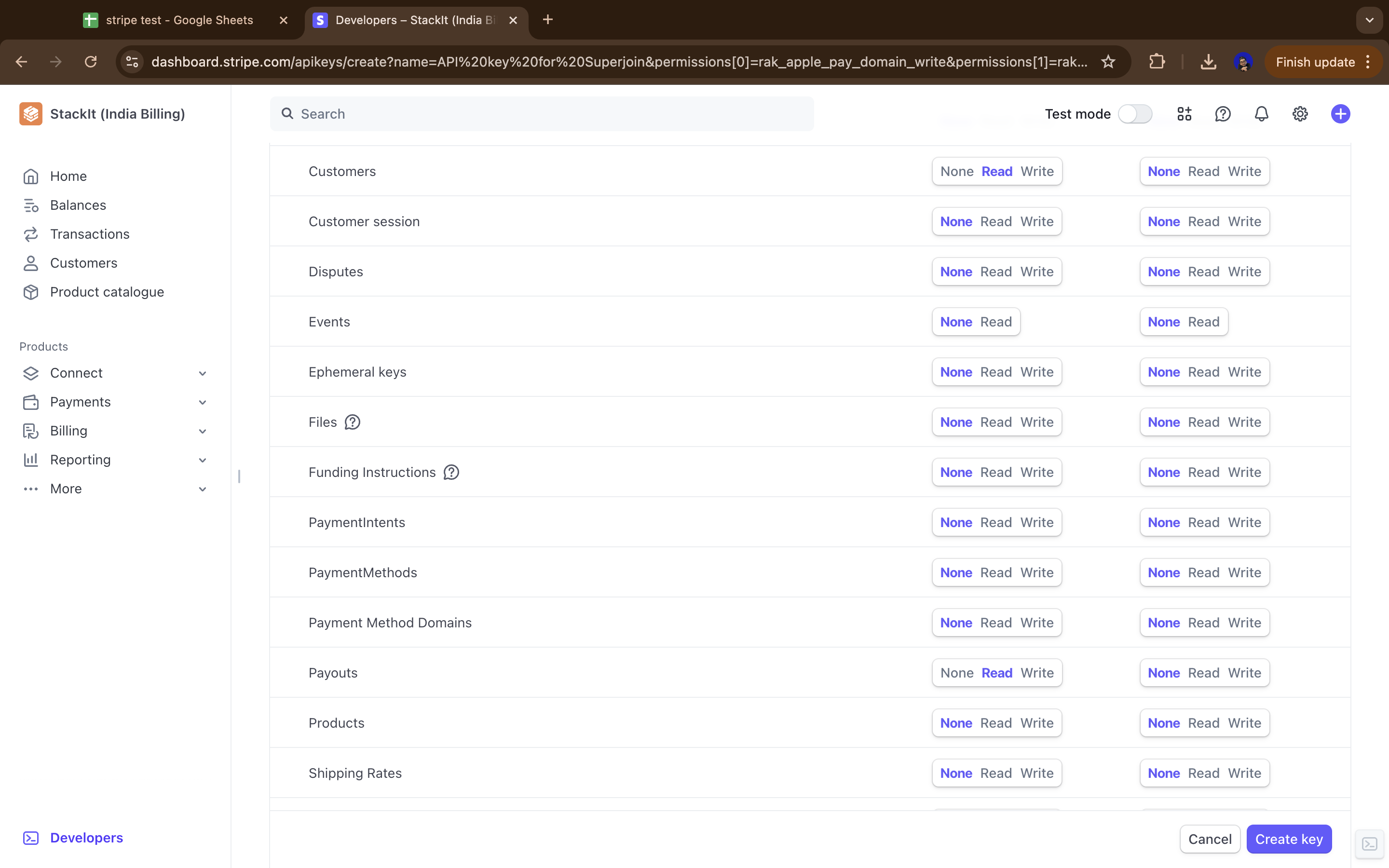
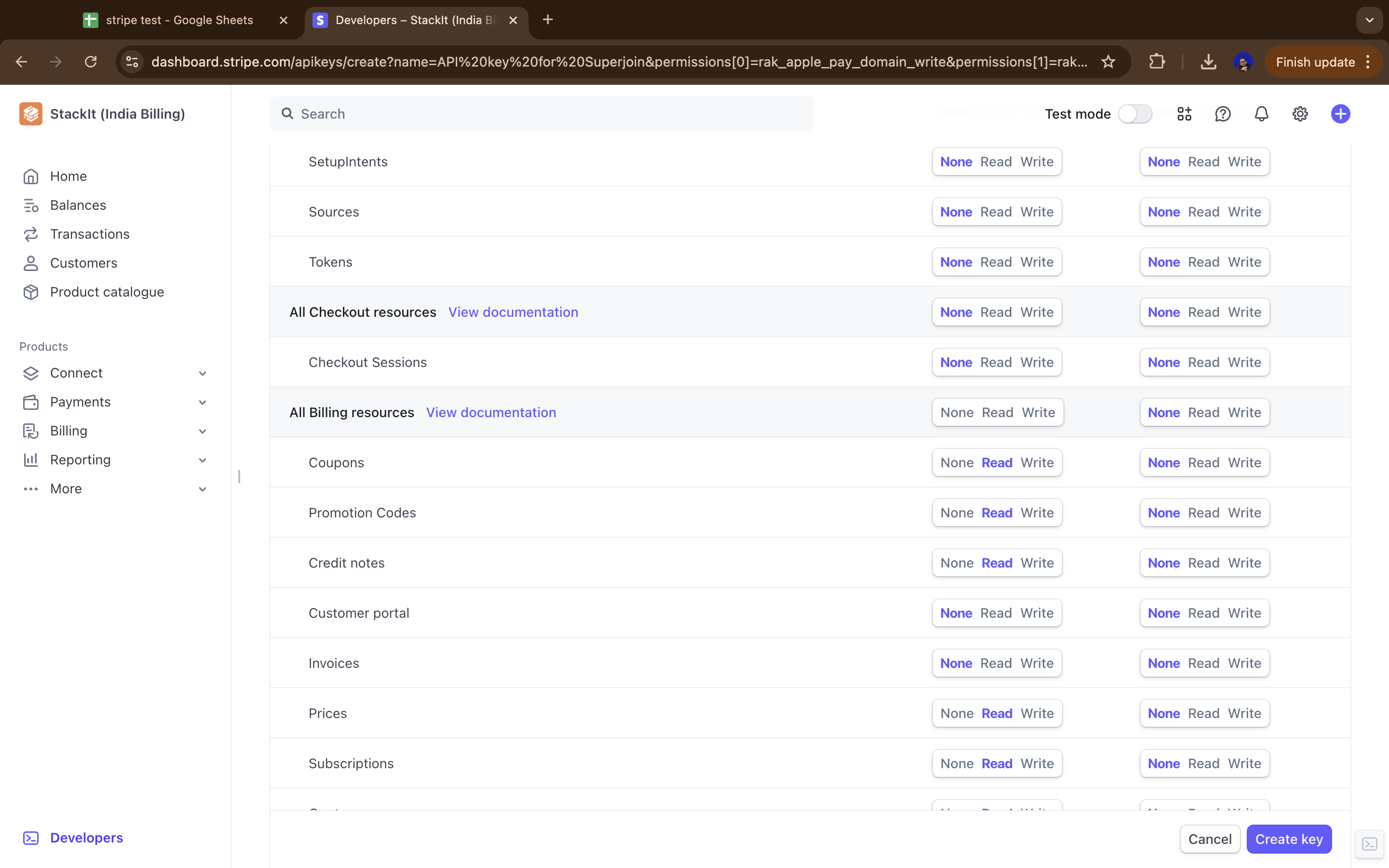
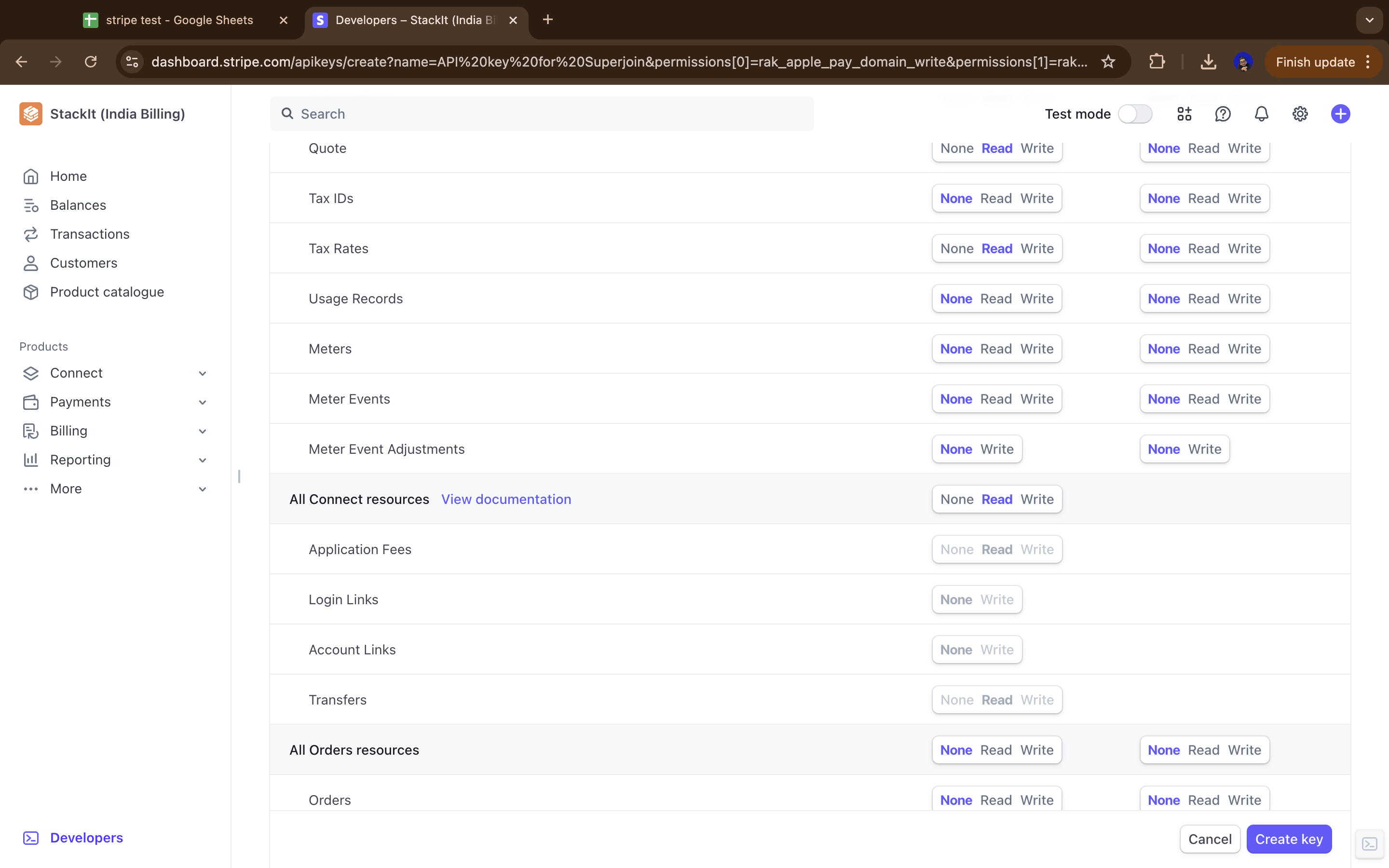
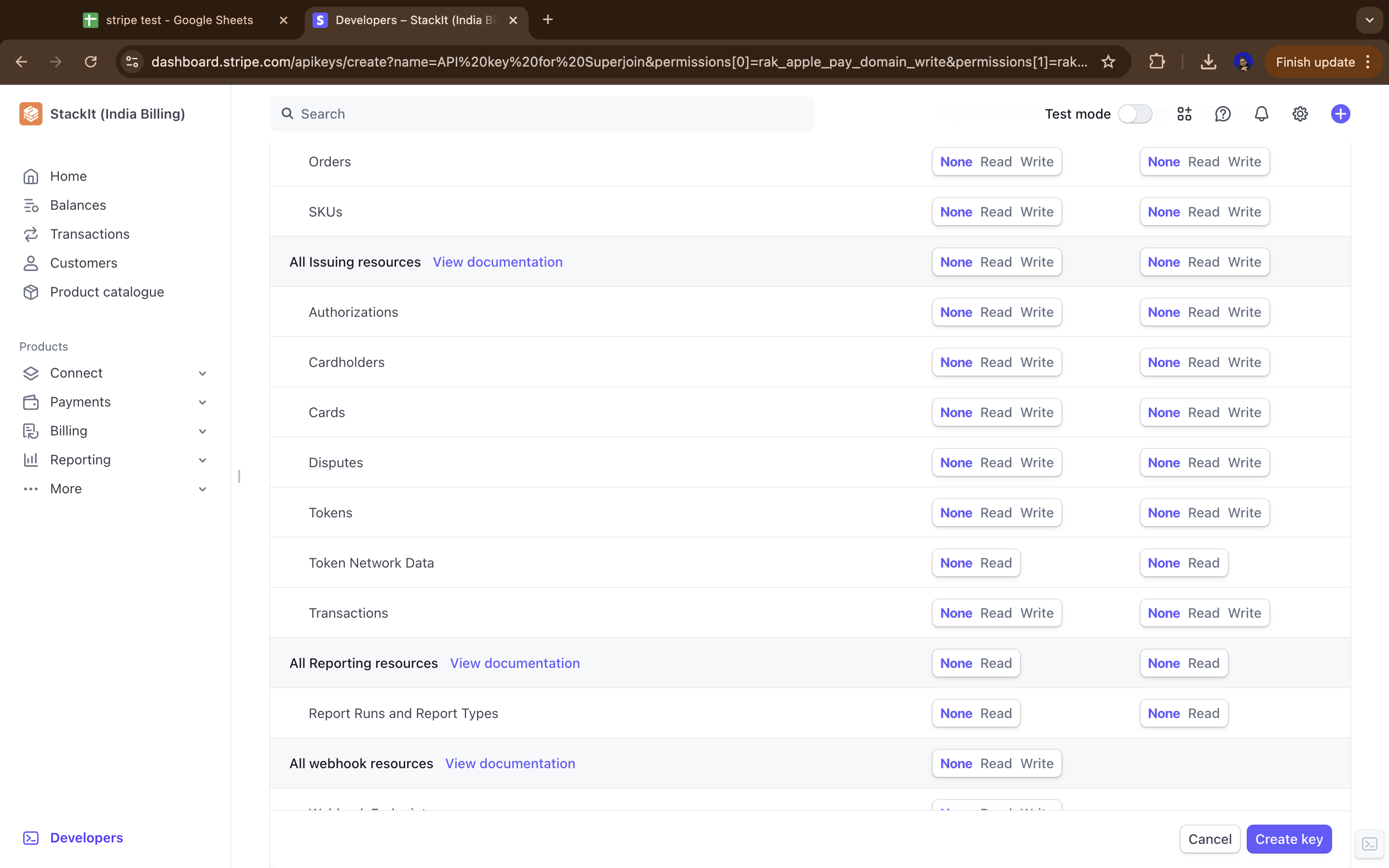
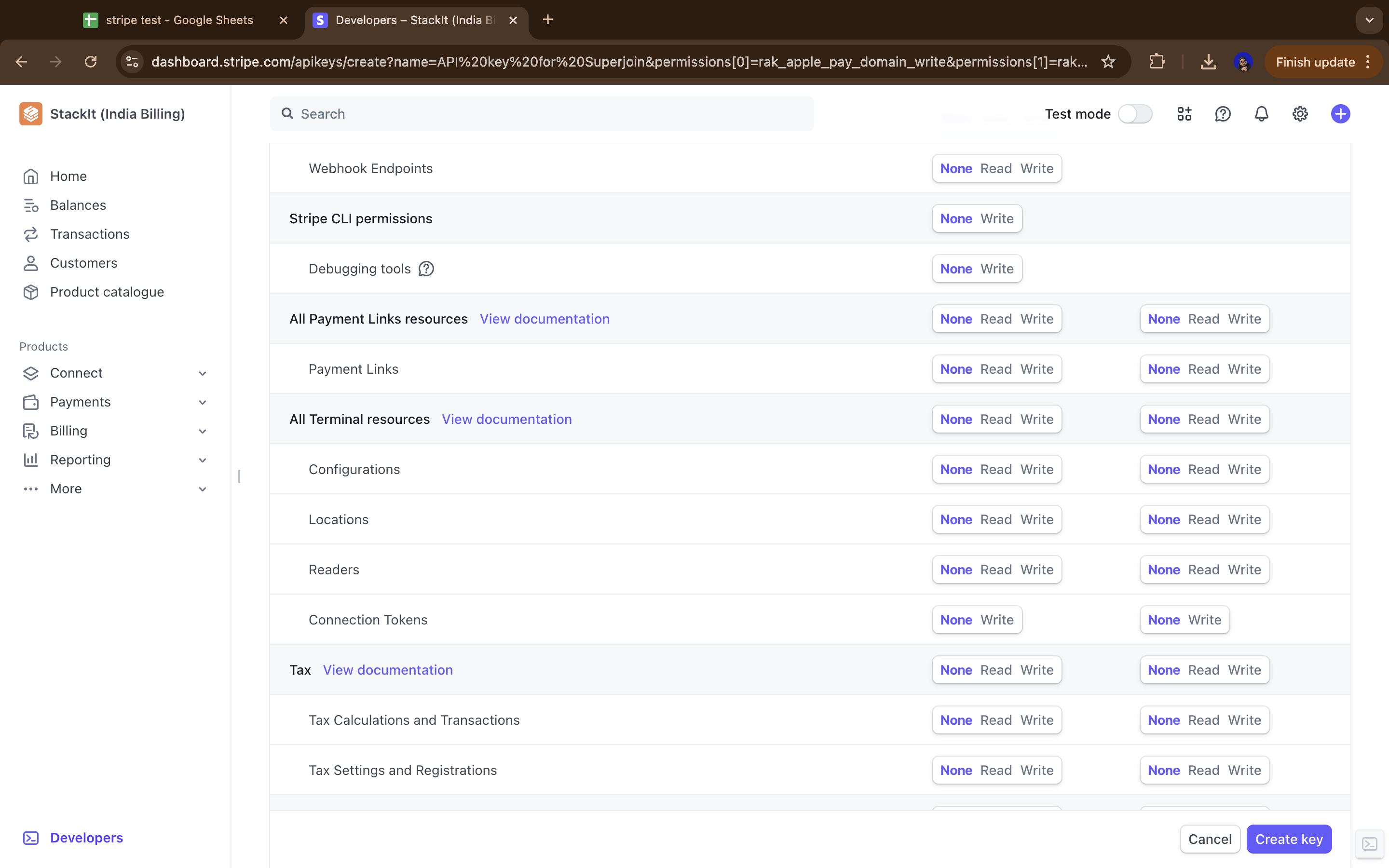
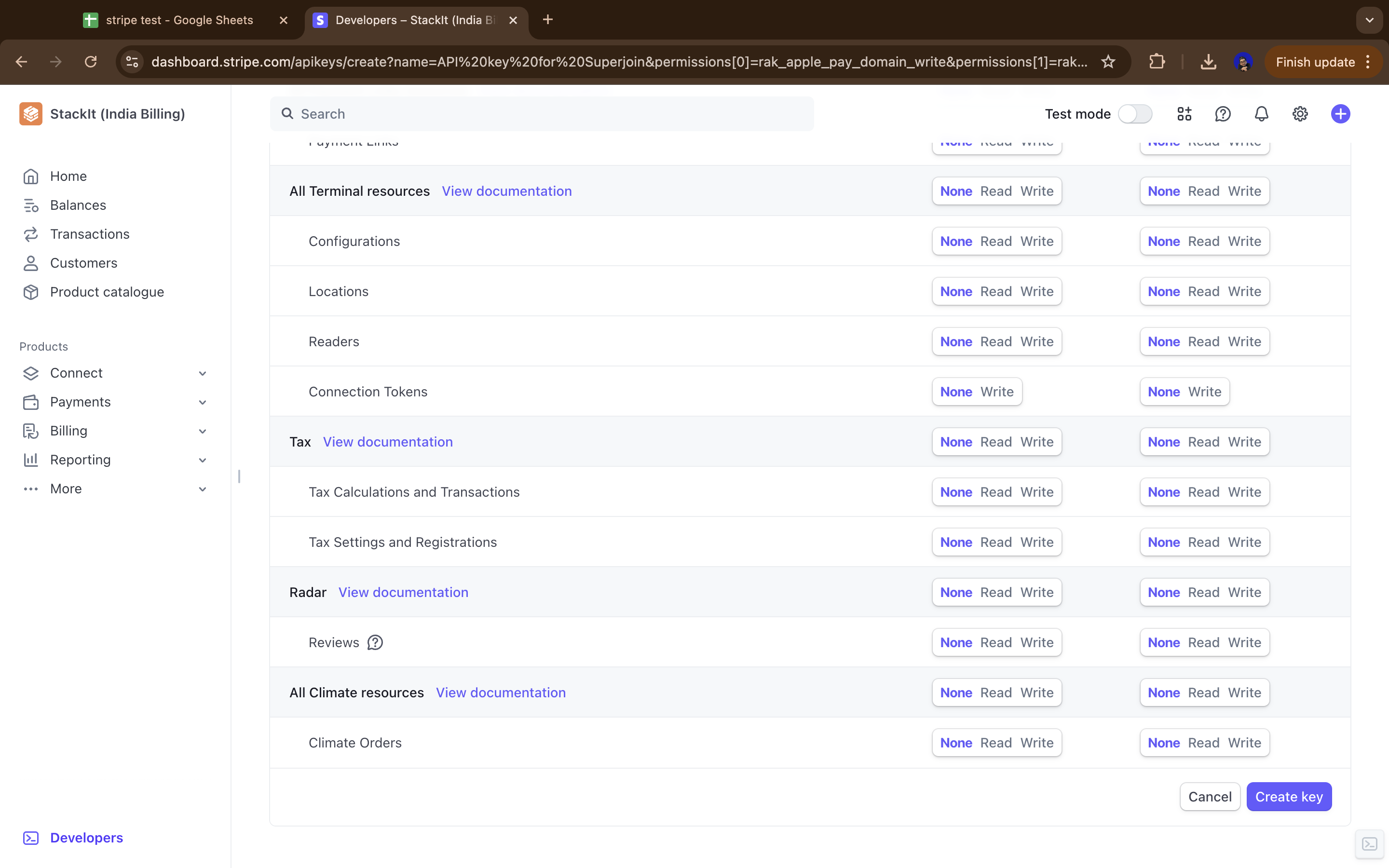
    Choose a Key name, and select permissions based on what data you need to access. Below is a suggested set of permissions that will work well with Superjoin, but you can customize these based on exactly what data you want to integrate.

    <Frame>
      <img src="https://mintcdn.com/superjoin/ko3_UmqC3SF-ISko/images/stripe/stripe_key3.png?fit=max&auto=format&n=ko3_UmqC3SF-ISko&q=85&s=3b02078a8721d2193f21cb7c80139acf" width="2880" height="1800" data-path="images/stripe/stripe_key3.png" />
    </Frame>

    <br />

    <Frame>
      <img src="https://mintcdn.com/superjoin/ko3_UmqC3SF-ISko/images/stripe/stripe_key4.png?fit=max&auto=format&n=ko3_UmqC3SF-ISko&q=85&s=1010d09a8f19996cc8c65173f0813af7" width="2880" height="1800" data-path="images/stripe/stripe_key4.png" />
    </Frame>

    <br />

    <Frame>
      <img src="https://mintcdn.com/superjoin/ko3_UmqC3SF-ISko/images/stripe/stripe_key5.png?fit=max&auto=format&n=ko3_UmqC3SF-ISko&q=85&s=ae46128283dfc828008f246f1184f6c9" width="2880" height="1800" data-path="images/stripe/stripe_key5.png" />
    </Frame>

    <br />

    <Frame>
      <img src="https://mintcdn.com/superjoin/ko3_UmqC3SF-ISko/images/stripe/stripe_key6.png?fit=max&auto=format&n=ko3_UmqC3SF-ISko&q=85&s=f9d760e27c1f86bb7d26f476bb0814b4" width="2880" height="1800" data-path="images/stripe/stripe_key6.png" />
    </Frame>

    <br />

    <Frame>
      <img src="https://mintcdn.com/superjoin/ko3_UmqC3SF-ISko/images/stripe/stripe_key7.png?fit=max&auto=format&n=ko3_UmqC3SF-ISko&q=85&s=275620dc4068e55321d3dd1b709a02cc" width="2880" height="1800" data-path="images/stripe/stripe_key7.png" />
    </Frame>

    <br />

    <Frame>
      <img src="https://mintcdn.com/superjoin/ko3_UmqC3SF-ISko/images/stripe/stripe_key8.png?fit=max&auto=format&n=ko3_UmqC3SF-ISko&q=85&s=83c5700b45f30b07f970b920cfb7ddbf" width="2880" height="1800" data-path="images/stripe/stripe_key8.png" />
    </Frame>

    <br />

    <Frame>
      <img src="https://mintcdn.com/superjoin/ko3_UmqC3SF-ISko/images/stripe/stripe_key9.png?fit=max&auto=format&n=ko3_UmqC3SF-ISko&q=85&s=771341e872816f8fd1e77c4163a73c64" width="2880" height="1800" data-path="images/stripe/stripe_key9.png" />
    </Frame>

    <br />

    ### Recommended Permissions Table

    Below is a comprehensive table of suggested permissions for your Stripe Restricted API key. You can adjust these based on what specific data you want to access through Superjoin.

    > **Note:** Most resources are set to "Read" permission to allow accessing data while maintaining security by not allowing write operations. Resources marked as "None" are typically not needed for data integration purposes.

    | Category                | Resource Type                     | Permissions |
    | :---------------------- | :-------------------------------- | :---------- |
    | **Core Resources**      |                                   |             |
    | Core                    | Apple Pay Domains                 | Read        |
    | Core                    | Balance                           | Read        |
    | Core                    | Balance transaction sources       | Read        |
    | Core                    | Balance Transfers                 | Read        |
    | Core                    | Charges                           | Read        |
    | Core                    | Confirmation token                | None        |
    | Core                    | Confirmation token (client)       | None        |
    | Core                    | Customers                         | Read        |
    | Core                    | Customer session                  | Read        |
    | Core                    | Disputes                          | Read        |
    | Core                    | Ephemeral keys                    | None        |
    | Core                    | Events                            | None        |
    | Core                    | Files                             | None        |
    | Core                    | Funding Instructions              | None        |
    | Core                    | Payment Intents                   | None        |
    | Core                    | Payment Methods                   | Read        |
    | Core                    | Payment Method Domains            | Read        |
    | Core                    | Payouts                           | Read        |
    | Core                    | Products                          | Read        |
    | Core                    | Setup Intents                     | None        |
    | Core                    | Shipping Rates                    | Read        |
    | Core                    | Sources                           | Read        |
    | Core                    | Test clocks                       | None        |
    | Core                    | Tokens                            | None        |
    | **Billing Resources**   |                                   |             |
    | Billing                 | Coupons                           | Read        |
    | Billing                 | Promotion Codes                   | Read        |
    | Billing                 | Credit notes                      | Read        |
    | Billing                 | Customer portal                   | Read        |
    | Billing                 | Invoices                          | Read        |
    | Billing                 | Prices                            | Read        |
    | Billing                 | Subscriptions                     | Read        |
    | Billing                 | Quote                             | Read        |
    | Billing                 | Tax IDs                           | Read        |
    | Billing                 | Tax Rates                         | Read        |
    | Billing                 | Usage Records                     | Read        |
    | Billing                 | Meter Events                      | Read        |
    | Billing                 | Meter Event Adjustments           | Read        |
    | **Checkout Resources**  |                                   |             |
    | Checkout                | Checkout Sessions                 | Read        |
    | **Connect Resources**   |                                   |             |
    | Connect                 | Application Fees                  | None        |
    | Connect                 | Login Links                       | None        |
    | Connect                 | Account Links                     | None        |
    | Connect                 | Top-ups                           | None        |
    | Connect                 | Transfers                         | None        |
    | **Orders Resources**    |                                   |             |
    | Orders                  | Orders                            | Read        |
    | Orders                  | SKUs                              | Read        |
    | **Reporting Resources** |                                   |             |
    | Reporting               | Report Runs and Report Types      | Read        |
    | **Tax Resources**       |                                   |             |
    | Tax                     | Tax Calculations and Transactions | Read        |
    | Tax                     | Tax Settings and Registrations    | Read        |
    | **Issuing Resources**   |                                   |             |
    | Issuing                 | Authorizations                    | None        |
    | Issuing                 | Cardholders                       | None        |
    | Issuing                 | Cards                             | None        |
    | Issuing                 | Disputes                          | None        |
    | Issuing                 | Tokens                            | None        |
    | Issuing                 | Token Network Data                | None        |
    | Issuing                 | Transactions                      | None        |
    | Issuing                 | Issuing Settlement                | None        |
    | **Other Resources**     |                                   |             |
    | Sigma                   | Sigma API Permission              | None        |
    | Financial Connections   | Financial Connections             | None        |
    | Identity                | Verification Sessions and Reports | None        |
    | All Webhook             | Webhook Endpoints                 | None        |
    | Stripe CLI              | Debugging tools                   | None        |
    | Payment Links           | Payment Links                     | None        |
    | Terminal                | Configurations                    | None        |
    | Terminal                | Locations                         | None        |
    | Terminal                | Readers                           | None        |
    | Terminal                | Connection Tokens                 | None        |
    | Radar                   | Reviews                           | None        |
    | Climate                 | Climate Orders                    | None        |
  </Step>

  <Step title="Create Key">
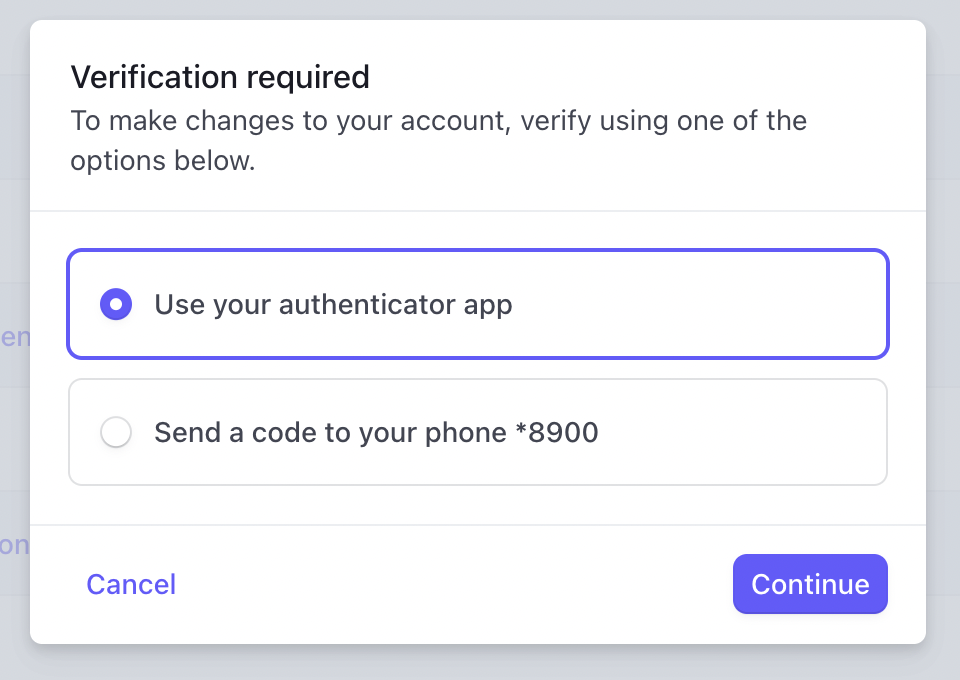
    Click on Create key. You may be prompted to enter a confirmation code sent to your mobile or email address.

    <Frame>
      <img src="https://assets.superjoin.ai/images/stripe/stripe-s8.png" />
    </Frame>
  </Step>
</Steps>

<Info title="Customizing Permissions">
  The permissions table above provides a suggested configuration that works well for most Superjoin integrations with Stripe. You can modify these permissions based on what specific data you want to access through your integration. In general, Read-only permissions are safest and sufficient for data integration purposes.
</Info>

<Info title="Additional info">For more details, use Stripe Documentation: [https://docs.stripe.com/keys](https://docs.stripe.com/keys)</Info>

## Setting up Stripe

<CardGroup cols={1}>
  <Card title="Looking to connect your Stripe account?" icon="life-ring" iconType="duotone" href="../Stripe/overview">
    Head over to the Stripe overview page to get a step by step guide to connect.
  </Card>
</CardGroup>
