> ## Documentation Index
> Fetch the complete documentation index at: https://docs.superjoin.ai/llms.txt
> Use this file to discover all available pages before exploring further.
# How to Troubleshoot your MySQL Connection?
> A comprehensive guide to diagnosing and resolving common MySQL connection issues with Superjoin.
Encountering connection issues with MySQL databases can be frustrating. This section provides a detailed explanation and resolution steps for common error messages.
Error Message: Unable to connect to the database, Please make sure that your database is running and that you have whitelisted all three of our IP addresses (3.6.225.10, 13.205.69.7, 13.204.201.25).
### Action Steps
Ensure your MySQL server is running by trying to connect via a tool like MySQL Workbench or through the command line.Whitelist the IP addresses (3.6.225.10, 13.205.69.7, 13.204.201.25) in your MySQL settings, which might involve modifying firewall settings or MySQL user privileges. If you've tried the above steps and still facing issues, don't hesitate to contact us at [support@superjoin.ai](mailto:support@superjoin.ai). We will respond immediately.
Error Message: Unable to connect to the database, Please ensure the database credentials are correct.
### Action Steps
Verify that the username and password in your connection settings match the credentials in your MySQL server.If necessary, reset the password for the user in MySQL and update it in your connection settings.Alternatively, it's best to create a new username/password. Create user like this `CREATE USER 'sammy'@'*' IDENTIFIED BY 'password';` and grant permission to databases like this `GRANT PRIVILEGE ON database.table TO 'username'@'host';` If you've tried the above steps and still facing issues, don't hesitate to contact us at [support@superjoin.ai](mailto:support@superjoin.ai). We will respond immediately.
Error Message: Unable to connect to the database, Please make sure that the database exists.
Ensure that the database name in your connection settings matches an actual database in your MySQL server. Here's the command: `SHOW DATABASES;` If the database does not exist, create it using a tool like MySQL Workbench or by executing a CREATE DATABASE SQL command.If you've tried the above steps and still facing issues, don't hesitate to contact us at [support@superjoin.ai](mailto:support@superjoin.ai). We will respond immediately.
Error Message: Unable to connect to the database, Please make sure that your database is running and that you have whitelisted all three of our IP address (3.6.225.10, 13.205.69.7, 13.204.201.25).
### Action Steps
Check if the MySQL server is operational and not experiencing downtime.Whitelist the IP addresses (3.6.225.10, 13.205.69.7, 13.204.201.25) in your MySQL settings, which might involve modifying firewall settings or MySQL user privileges.If you've tried the above steps and still facing issues, don't hesitate to contact us at [support@superjoin.ai](mailto:support@superjoin.ai). We will respond immediately.
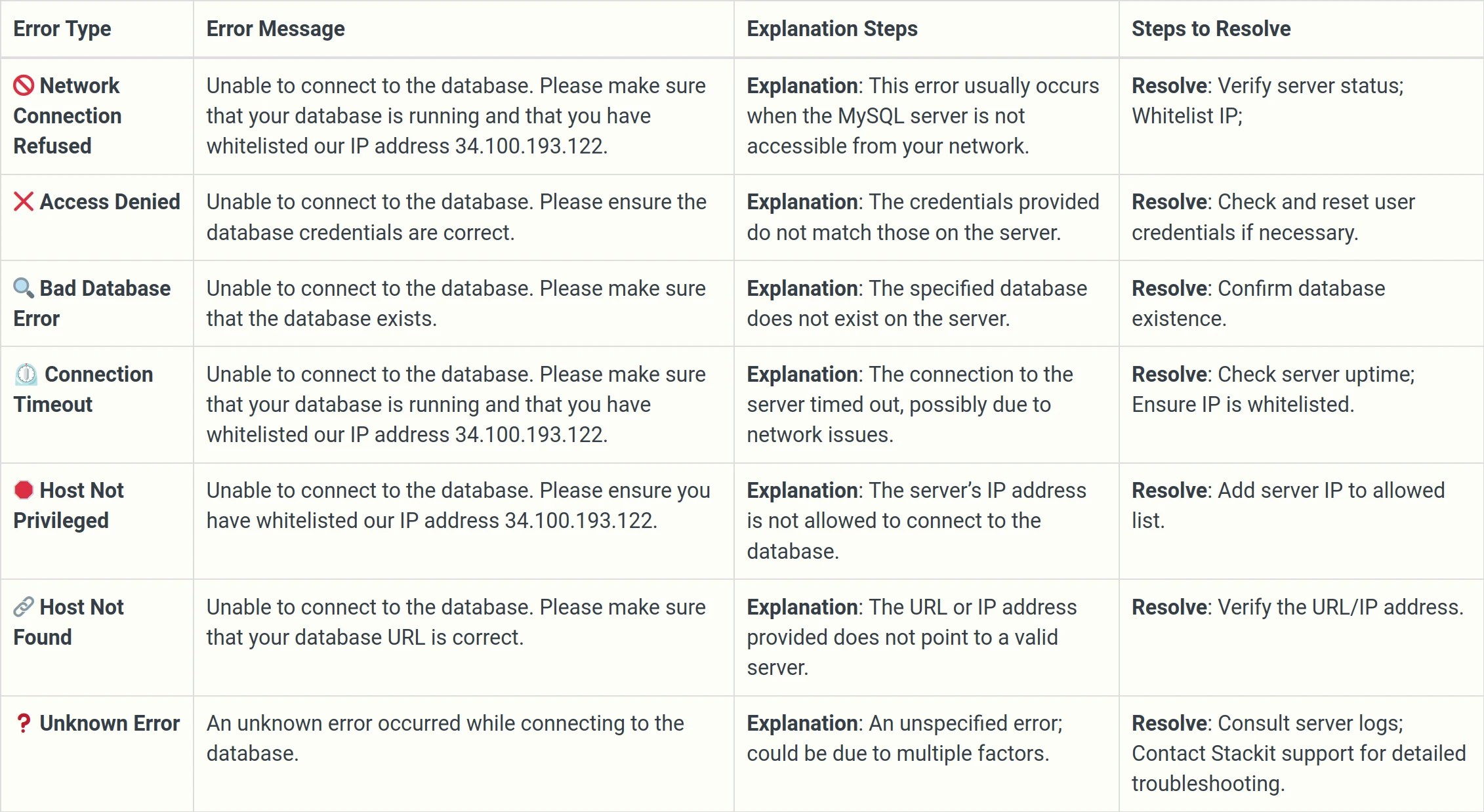
## Summarising all the errors that you could face while connecting to your MySQL DB