> ## Documentation Index
> Fetch the complete documentation index at: https://docs.superjoin.ai/llms.txt
> Use this file to discover all available pages before exploring further.
# SUPERGPT Functions for Sheets
> Discover all available functions in SUPERGPT for Sheets, along with simple examples and an extensive list of paramaters.
Only available on Google Sheets
Prepare to transform your Google Sheets experience with the groundbreaking SUPERGPT Functions! 🌟 Powered by OpenAI's advanced language model, these tools enable you to conduct natural language processing, generate text, perform sentiment analysis, and even create code right in your spreadsheets. 🚀 Unlock new insights and enhance decision-making with these capabilities, streamlining your workflows for peak productivity. Dive into a new realm of possibilities and elevate your spreadsheet game with SUPERGPT functions!
You have opened a Google spreadsheet and selected Extensions > Superjoin > Enable SUPERGPT functions.
To enable SUPERGPT functions, you must be the Creator of the spreadsheet.
## How to use SUPERGPT Functions on Google Sheet?
## SUPERGPT function
The simplest function to start using SUPERGPT in Google Sheets. Outputs the result in a single cell.
**How to use**
| Syntax | =SUPERGPT(prompt, \[value], \[temperature], \[model]) |
| ------------------ | ----------------------------------------------------- |
| Copy/paste example | `=SUPERGPT("Write a tagline for an ice cream shop.")` |
| Output | A response to your prompt in a single cell |
**Parameters**
| Parameter | Definition |
| ------------------------ | ------------------------------------------------------------------------------------------------------------------------------------------------------------------------------------------------------------------------------- |
| prompt (cannot be empty) | Instruction provided to the AI to generate a result in a single cell. The prompt parameter can be: - A string: `"Write a tagline for an ice cream shop."` - A cell: `A1` -A range of cells: `A1:C3` |
| value (optional) | Text, cell or range you want your prompt to apply to |
| temperature (optional) | temperature is a number between 0 and 1. Use it to control creativity. |
## SUPERGPT\_LIST function
Like the SUPERGPT function, but even more user-friendly for quickly generating results in a list format.
**How to use**
| Syntax | =SUPERGPT\_LIST(prompt, \[value], \[temperature], \[model]) |
| ------------------ | -------------------------------------------------------------------- |
| Copy/paste example | `=SUPERGPT_LIST("Give me 5 good short ads about spreadsheets.")` |
| Output | As many responses to your prompt as you asked, one response per cell |
**Parameters**
| Parameter | Definition |
| ------------------------ | ------------------------------------------------------------------------------------------------------------------------------------------------------------------------------------------------------------------ |
| prompt (cannot be empty) | Instruction provided to the AI to generate a list. The prompt parameter can be: - A string: `"Give me 5 good short ads about spreadsheets."` - A cell: `A1` -A range of cells: `A1:C3` |
| value (optional) | Text, cell or range you want your prompt to apply to |
| temperature (optional) | temperature is a number between 0 and 1. Use it to control creativity. |
## SUPERGPT\_FILL function
Fill in a range with generated results that follow the pattern of the example rows you choose!
**How to use**
| Syntax | =SUPERGPT\_FILL(examples, \[inputs], \[temperature]) |
| ------------------ | ------------------------------------------------------------------------- |
| Copy/paste example | `=SUPERGPT_FILL(S4:U5,S6:S14)` |
| Output | The empty part of the range will be filled based on the examples provided |
**Parameters**
| Parameter | Definition |
| -------------------------- | --------------------------------------------------------------------------------- |
| examples (cannot be empty) | Range containing complete examples that the AI should learn from (example: S4:U5) |
| inputs (optional) | Range containing incomplete data that the AI should complete from the examples |
| temperature (optional) | temperature is a number between 0 and 1. Use it to control creativity. |
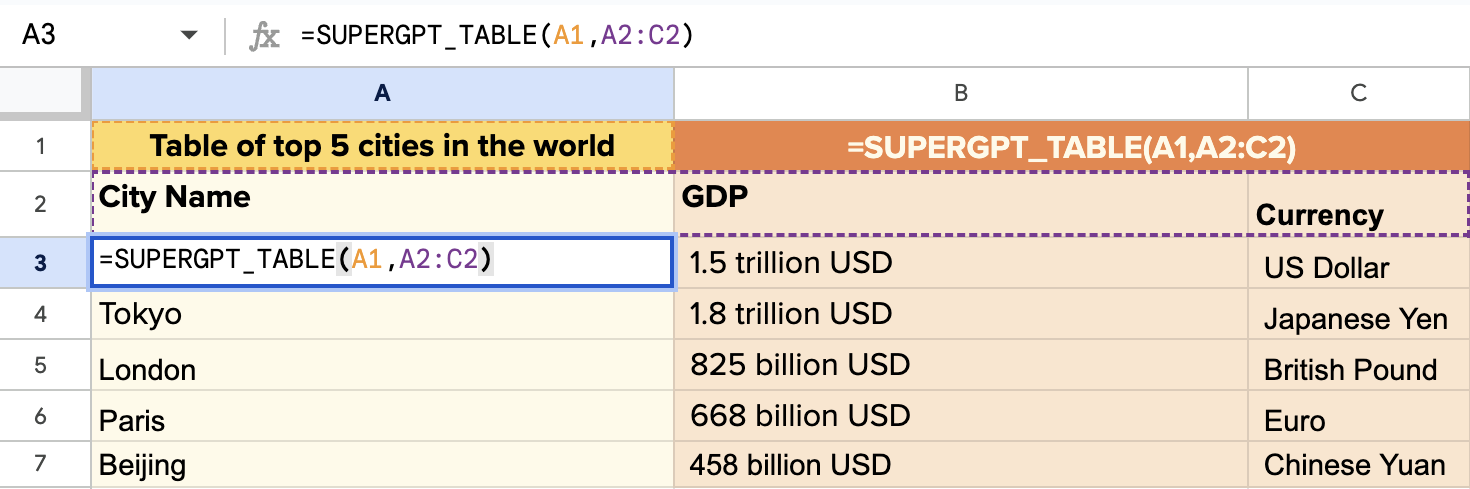
## SUPERGPT\_TABLE function
Like SUPERGPT, but outputs the results in a table. Very practical when the output is a table
**How to use**
| Syntax | =SUPERGPT\_TABLE(prompt, \[head], \[inputs], \[temperature]) |
| ------------------ | ----------------------------------------------------------------------------------------- |
| Copy/paste example | `=SUPERGPT_TABLE("top 10 most eaten fruits and their nutrition data", A1:D1, A2:A5, 0.8)` |
| Output | The response to your prompt in the shape of a table |
**Parameters**
| Parameter | Definition |
| ------------------------ | ----------------------------------------------------------------------------------------------------------------------------------------------------------------------------------------------------- |
| prompt (cannot be empty) | Instruction to generate a table. The prompt parameter can be: - A string: `"top 10 most eaten fruits and their nutrition data"` - A cell: `A1` -A range of cells: `A1:C3` |
| head (optional) | Range containing at least one row. the first row should be headers, the following rows can be used to specify examples If left empty, headers will be generated automatically. |
| inputs (optional) | Range containing partial rows to complete with SUPERGPT\_TABLE |
| temperature (optional) | temperature is a number between 0 and 1. Use it to control creativity. |
## SUPERGPT\_EDIT function
Applies the given task to the given text. The default task is to fix grammar and spelling.
**How to use**
| Syntax | =SUPERGPT\_EDIT(text, \[task], \[temperature]) |
| ------------------ | ------------------------------------------------------------------------------------- |
| Copy/paste example | `=SUPERGPT_EDIT("It is to cold in hear.", "Fix spelling and grammar mistakes.", 0.8)` |
| Output | The edited text in a single cell |
**Parameters**
| Parameter | Definition |
| ---------------------- | ------------------------------------------------------------------------------------------------------------------------------------------------------------------------------------------------------------------------------------- |
| text (cannot be empty) | Input text to edit. The text parameter can be: - A string: `"It is to cold in hear."` - A cell: `A1` -A range of cells: `A1:C3` |
| task (cannot be empty) | Text, cell or range specifying how the text should be edited. Defaults to fixing grammar and spelling. Other examples: - "Make it funnier" - "Make it shorter" - "Make it sound formal" - "Add an ending" |
| temperature (optional) | temperature is a number between 0 and 1. Use it to control creativity. |
## SUPERGPT\_TAG function
Applies user-defined tags to text or automatically suggests relevant tags if none are specified.
**How to use**
| Syntax | =SUPERGPT\_TAG(value, \[tags], \[examples], \[top\_k], \[temperature]) |
| ------------------ | ---------------------------------------------------------------------- |
| Copy/paste example | `=SUPERGPT_TAG("I love chocolate", "food, positive, negative")` |
| Output | The applicable tags as csv in a single cell |
**Parameters**
| Parameter | Definition |
| ----------------------- | ----------------------------------------------------------------------------------------------------------------------------------------------------- |
| value (cannot be empty) | Input text to tag. The value parameter can be: - A string: `"I love chocolate"` - A cell: `A1` -A range of cells: `A1:C3` |
| tags (optional) | Comma-separated tags or range of tags applicable. If left empty, SUPERGPT\_TAG will automatically come up with the tags |
| top\_k (optional) | Maximum number of tags to return |
| examples (optional) | A table of examples in two columns. The first column should contain the inputs and the second column should contain the outputs. |
| temperature (optional) | temperature is a number between 0 and 1. Use it to control creativity. |
## SUPERGPT\_CLASSIFY function
Classifies a given text into a single category.
**How to use**
| Syntax | =SUPERGPT\_CLASSIFY(value, categories, \[examples], \[temperature]) |
| ------------------ | ------------------------------------------------------------------- |
| Copy/paste example | `=SUPERGPT_CLASSIFY("banana", "fruit, vegetable")` |
| Output | The best applicable category |
**Parameters**
| Parameter | Definition |
| ---------------------------- | ------------------------------------------------------------------------------------------------------------------------------------------------ |
| value (cannot be empty) | Input text to classify. The value parameter can be: - A string: `"banana"` - A cell: `A1` -A range of cells: `A1:C3` |
| categories (cannot be empty) | Comma-separated categories or range of categories to choose from. Only the most relevant category will be returned. |
| examples (optional) | A table of examples in two columns. The first column should contain the inputs and the second column should contain the outputs. |
| temperature (optional) | temperature is a number between 0 and 1. Use it to control creativity. |
## SUPERGPT\_EXTRACT function
Extracts data (like email addresses or company names) from a text. Outputs as comma-separated values.
**How to use**
| Syntax | =SUPERGPT\_EXTRACT(text, to\_extract, \[temperature]) |
| ------------------ | -------------------------------------------------------------------------------------------- |
| Copy/paste example | `=SUPERGPT_EXTRACT("I worked 5 years at Amazon.com and then 3 years at Apple", "companies")` |
| Output | The extracted entities as comma-separated values in a single cell |
**Parameters**
| Parameter | Definition |
| ----------------------------- | ---------------------------------------------------------------------------------------------------------------------------------------------------------------------------------------------------------- |
| text (cannot be empty) | Input text to extract data from. The text parameter can be: - A string: `"I worked 5 years at Amazon.com and then 3 years at Apple"` - A cell: `A1` -A range of cells: `A1:C3` |
| to\_extract (cannot be empty) | Text, cell or horizontal range specifying what you want to extract. Examples: - `"companies"` - `B3:E3` |
| temperature (optional) | temperature is a number between 0 and 1. Use it to control creativity. |
## SUPERGPT\_SUMMARIZE function
Summarizes text according to a given format (three sentences by default).
**How to use**
| Syntax | =SUPERGPT\_SUMMARIZE(text, \[format], \[temperature]) |
| ------------------ | ------------------------------------------------------------------------------------------------------------------------------------------------------------------------------------------------------------------------------------------------- |
| Copy/paste example | `=SUPERGPT_SUMMARIZE(A2:A10, “10 words or less”)` |
| Output | Returns a summary of the input text in the format specified. Note - If selecting to summarize a range of cells, the output will be a summary for each individual cell of the selected range, not a single summary of all cells included in range. |
**Parameters**
| Parameter | Definition |
| ---------------------- | ------------------------------------------------------------------------------------------------------------------------------------------------------------ |
| text (cannot be empty) | Input text to summarize. The text parameter can be: - A string: `"Some long content"` - A cell: `A1` -A range of cells: `A1:C3` |
| format (optional) | Format of the summary. Examples: - `"key takeaways"` - `"action items"` - `"two paragraphs"` - `"100 words"` - `"tweets"` |
| temperature (optional) | temperature is a number between 0 and 1. Use it to control creativity. |
## SUPERGPT\_TRANSLATE function
Translates text from one language into another. Works better if you specify the source language.
**How to use**
| Syntax | =SUPERGPT\_TRANSLATE(text, \[target\_language], \[source\_language], \[instructions],\[temperature]) |
| ------------------ | ---------------------------------------------------------------------------------------------------- |
| Copy/paste example | `=SUPERGPT_TRANSLATE("Cool off with our delicious treats!", "spanish")` |
| Output | The requested translation in a single cell |
**Parameters**
| Parameter | Definition |
| --------------------------- | ----------------------------------------------------------------------------------------------------------------------------------------------------------------------------- |
| text (cannot be empty) | Input text to translate. The text parameter can be: - A string: `"Cool off with our delicious treats!"` - A cell: `A1` -A range of cells: `A1:C3` |
| target\_language (optional) | Language of the output. Examples: "spanish", "chinese", "french". Defaults to "english". |
| source\_language (optional) | Language of the input. Example: "english" |
| instructions (optional) | Additional instructions for the translation. Can include a dictionary of translations. |
| temperature (optional) | temperature is a number between 0 and 1. Use it to control creativity. |
## FAQs for SUPERGPT\_ Functions
Yes, to ensure that SUPERGPT can provide a sufficient response, we have set a character limit of 2k tokens. This is about 8k characters for the prompt.
For SUPERGPT Functions to calculate, you will need to open the Superjoin sidebar at least once.
Anyone with Editor (Google Sheets Permissions) can use the SUPERGPT functions, however - all the usage will incur on the owner of the spreadsheet who first launched Superjoin.
The SUPERGPT functions, similar to Google Sheet formulas, recalculate when you reload the sheet. To avoid these recalculations affecting your usage limits, you can use the button "Convert Formulas to Values" on Superjoin.
 **How to use**
| Syntax | =SUPERGPT(prompt, \[value], \[temperature], \[model]) |
| ------------------ | ----------------------------------------------------- |
| Copy/paste example | `=SUPERGPT("Write a tagline for an ice cream shop.")` |
| Output | A response to your prompt in a single cell |
**Parameters**
| Parameter | Definition |
| ------------------------ | ------------------------------------------------------------------------------------------------------------------------------------------------------------------------------------------------------------------------------- |
| prompt (cannot be empty) | Instruction provided to the AI to generate a result in a single cell.
**How to use**
| Syntax | =SUPERGPT(prompt, \[value], \[temperature], \[model]) |
| ------------------ | ----------------------------------------------------- |
| Copy/paste example | `=SUPERGPT("Write a tagline for an ice cream shop.")` |
| Output | A response to your prompt in a single cell |
**Parameters**
| Parameter | Definition |
| ------------------------ | ------------------------------------------------------------------------------------------------------------------------------------------------------------------------------------------------------------------------------- |
| prompt (cannot be empty) | Instruction provided to the AI to generate a result in a single cell. 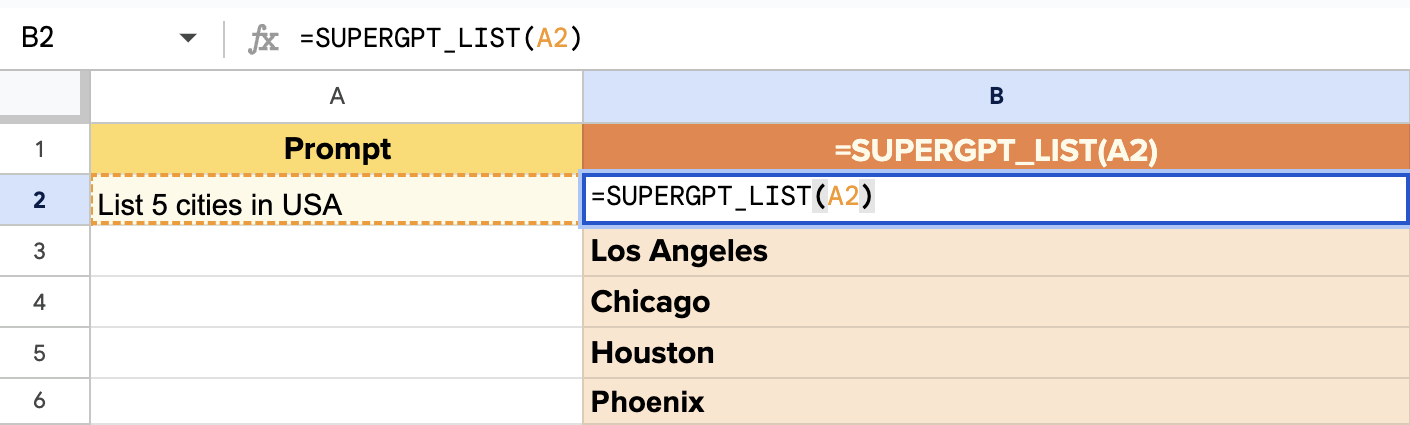 **How to use**
| Syntax | =SUPERGPT\_LIST(prompt, \[value], \[temperature], \[model]) |
| ------------------ | -------------------------------------------------------------------- |
| Copy/paste example | `=SUPERGPT_LIST("Give me 5 good short ads about spreadsheets.")` |
| Output | As many responses to your prompt as you asked, one response per cell |
**Parameters**
| Parameter | Definition |
| ------------------------ | ------------------------------------------------------------------------------------------------------------------------------------------------------------------------------------------------------------------ |
| prompt (cannot be empty) | Instruction provided to the AI to generate a list.
**How to use**
| Syntax | =SUPERGPT\_LIST(prompt, \[value], \[temperature], \[model]) |
| ------------------ | -------------------------------------------------------------------- |
| Copy/paste example | `=SUPERGPT_LIST("Give me 5 good short ads about spreadsheets.")` |
| Output | As many responses to your prompt as you asked, one response per cell |
**Parameters**
| Parameter | Definition |
| ------------------------ | ------------------------------------------------------------------------------------------------------------------------------------------------------------------------------------------------------------------ |
| prompt (cannot be empty) | Instruction provided to the AI to generate a list. 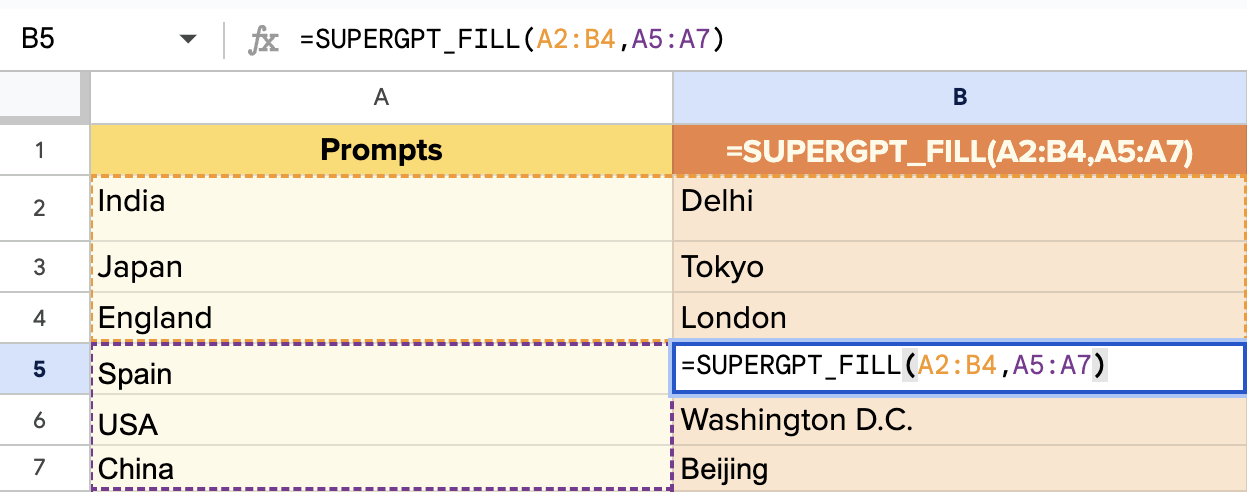 **How to use**
| Syntax | =SUPERGPT\_FILL(examples, \[inputs], \[temperature]) |
| ------------------ | ------------------------------------------------------------------------- |
| Copy/paste example | `=SUPERGPT_FILL(S4:U5,S6:S14)` |
| Output | The empty part of the range will be filled based on the examples provided |
**Parameters**
| Parameter | Definition |
| -------------------------- | --------------------------------------------------------------------------------- |
| examples (cannot be empty) | Range containing complete examples that the AI should learn from (example: S4:U5) |
| inputs (optional) | Range containing incomplete data that the AI should complete from the examples |
| temperature (optional) | temperature is a number between 0 and 1. Use it to control creativity. |
## SUPERGPT\_TABLE function
Like SUPERGPT, but outputs the results in a table. Very practical when the output is a table
**How to use**
| Syntax | =SUPERGPT\_FILL(examples, \[inputs], \[temperature]) |
| ------------------ | ------------------------------------------------------------------------- |
| Copy/paste example | `=SUPERGPT_FILL(S4:U5,S6:S14)` |
| Output | The empty part of the range will be filled based on the examples provided |
**Parameters**
| Parameter | Definition |
| -------------------------- | --------------------------------------------------------------------------------- |
| examples (cannot be empty) | Range containing complete examples that the AI should learn from (example: S4:U5) |
| inputs (optional) | Range containing incomplete data that the AI should complete from the examples |
| temperature (optional) | temperature is a number between 0 and 1. Use it to control creativity. |
## SUPERGPT\_TABLE function
Like SUPERGPT, but outputs the results in a table. Very practical when the output is a table
 **How to use**
| Syntax | =SUPERGPT\_TABLE(prompt, \[head], \[inputs], \[temperature]) |
| ------------------ | ----------------------------------------------------------------------------------------- |
| Copy/paste example | `=SUPERGPT_TABLE("top 10 most eaten fruits and their nutrition data", A1:D1, A2:A5, 0.8)` |
| Output | The response to your prompt in the shape of a table |
**Parameters**
| Parameter | Definition |
| ------------------------ | ----------------------------------------------------------------------------------------------------------------------------------------------------------------------------------------------------- |
| prompt (cannot be empty) | Instruction to generate a table.
**How to use**
| Syntax | =SUPERGPT\_TABLE(prompt, \[head], \[inputs], \[temperature]) |
| ------------------ | ----------------------------------------------------------------------------------------- |
| Copy/paste example | `=SUPERGPT_TABLE("top 10 most eaten fruits and their nutrition data", A1:D1, A2:A5, 0.8)` |
| Output | The response to your prompt in the shape of a table |
**Parameters**
| Parameter | Definition |
| ------------------------ | ----------------------------------------------------------------------------------------------------------------------------------------------------------------------------------------------------- |
| prompt (cannot be empty) | Instruction to generate a table.  **How to use**
| Syntax | =SUPERGPT\_EDIT(text, \[task], \[temperature]) |
| ------------------ | ------------------------------------------------------------------------------------- |
| Copy/paste example | `=SUPERGPT_EDIT("It is to cold in hear.", "Fix spelling and grammar mistakes.", 0.8)` |
| Output | The edited text in a single cell |
**Parameters**
| Parameter | Definition |
| ---------------------- | ------------------------------------------------------------------------------------------------------------------------------------------------------------------------------------------------------------------------------------- |
| text (cannot be empty) | Input text to edit.
**How to use**
| Syntax | =SUPERGPT\_EDIT(text, \[task], \[temperature]) |
| ------------------ | ------------------------------------------------------------------------------------- |
| Copy/paste example | `=SUPERGPT_EDIT("It is to cold in hear.", "Fix spelling and grammar mistakes.", 0.8)` |
| Output | The edited text in a single cell |
**Parameters**
| Parameter | Definition |
| ---------------------- | ------------------------------------------------------------------------------------------------------------------------------------------------------------------------------------------------------------------------------------- |
| text (cannot be empty) | Input text to edit. 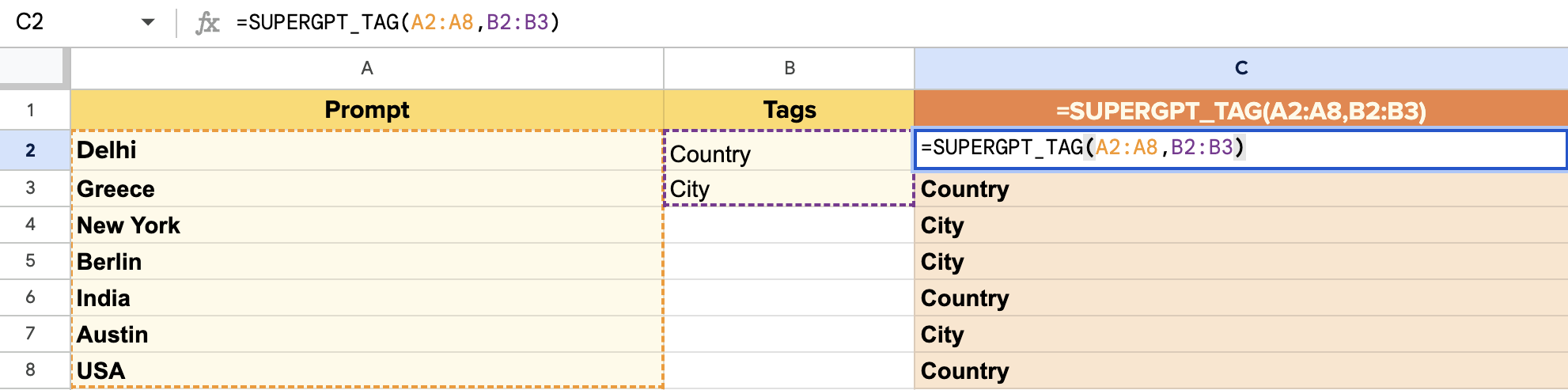 **How to use**
| Syntax | =SUPERGPT\_TAG(value, \[tags], \[examples], \[top\_k], \[temperature]) |
| ------------------ | ---------------------------------------------------------------------- |
| Copy/paste example | `=SUPERGPT_TAG("I love chocolate", "food, positive, negative")` |
| Output | The applicable tags as csv in a single cell |
**Parameters**
| Parameter | Definition |
| ----------------------- | ----------------------------------------------------------------------------------------------------------------------------------------------------- |
| value (cannot be empty) | Input text to tag.
**How to use**
| Syntax | =SUPERGPT\_TAG(value, \[tags], \[examples], \[top\_k], \[temperature]) |
| ------------------ | ---------------------------------------------------------------------- |
| Copy/paste example | `=SUPERGPT_TAG("I love chocolate", "food, positive, negative")` |
| Output | The applicable tags as csv in a single cell |
**Parameters**
| Parameter | Definition |
| ----------------------- | ----------------------------------------------------------------------------------------------------------------------------------------------------- |
| value (cannot be empty) | Input text to tag. 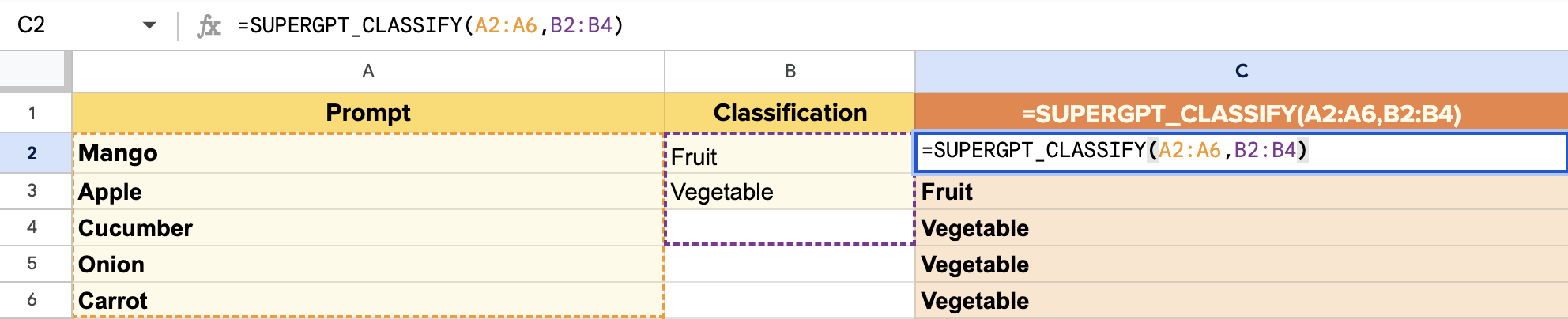 **How to use**
| Syntax | =SUPERGPT\_CLASSIFY(value, categories, \[examples], \[temperature]) |
| ------------------ | ------------------------------------------------------------------- |
| Copy/paste example | `=SUPERGPT_CLASSIFY("banana", "fruit, vegetable")` |
| Output | The best applicable category |
**Parameters**
| Parameter | Definition |
| ---------------------------- | ------------------------------------------------------------------------------------------------------------------------------------------------ |
| value (cannot be empty) | Input text to classify.
**How to use**
| Syntax | =SUPERGPT\_CLASSIFY(value, categories, \[examples], \[temperature]) |
| ------------------ | ------------------------------------------------------------------- |
| Copy/paste example | `=SUPERGPT_CLASSIFY("banana", "fruit, vegetable")` |
| Output | The best applicable category |
**Parameters**
| Parameter | Definition |
| ---------------------------- | ------------------------------------------------------------------------------------------------------------------------------------------------ |
| value (cannot be empty) | Input text to classify. 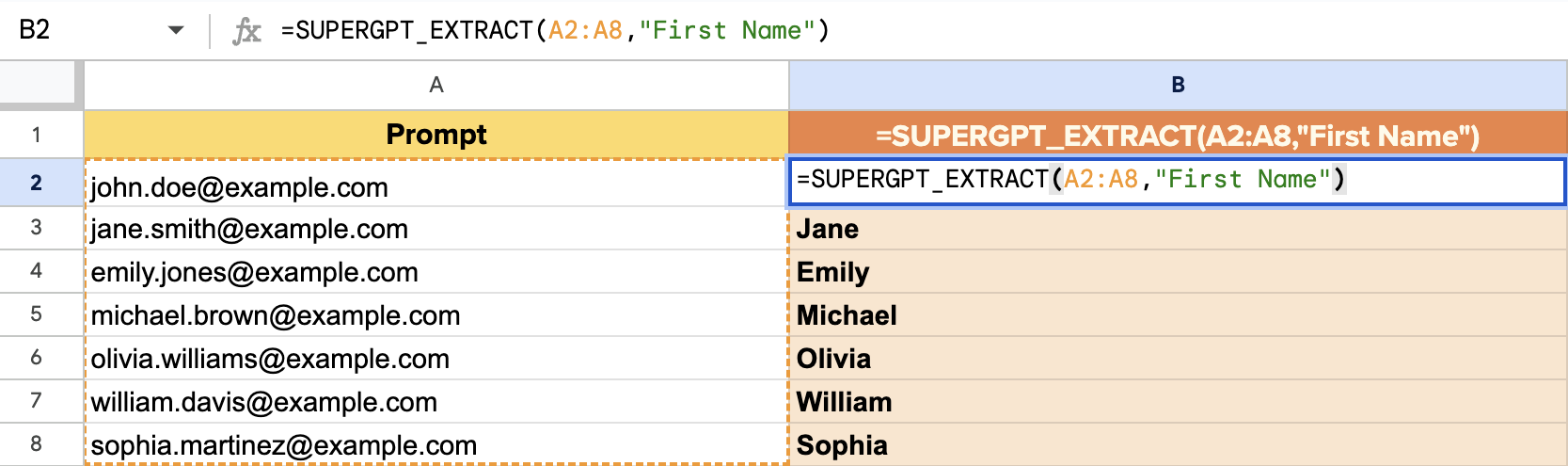 **How to use**
| Syntax | =SUPERGPT\_EXTRACT(text, to\_extract, \[temperature]) |
| ------------------ | -------------------------------------------------------------------------------------------- |
| Copy/paste example | `=SUPERGPT_EXTRACT("I worked 5 years at Amazon.com and then 3 years at Apple", "companies")` |
| Output | The extracted entities as comma-separated values in a single cell |
**Parameters**
| Parameter | Definition |
| ----------------------------- | ---------------------------------------------------------------------------------------------------------------------------------------------------------------------------------------------------------- |
| text (cannot be empty) | Input text to extract data from.
**How to use**
| Syntax | =SUPERGPT\_EXTRACT(text, to\_extract, \[temperature]) |
| ------------------ | -------------------------------------------------------------------------------------------- |
| Copy/paste example | `=SUPERGPT_EXTRACT("I worked 5 years at Amazon.com and then 3 years at Apple", "companies")` |
| Output | The extracted entities as comma-separated values in a single cell |
**Parameters**
| Parameter | Definition |
| ----------------------------- | ---------------------------------------------------------------------------------------------------------------------------------------------------------------------------------------------------------- |
| text (cannot be empty) | Input text to extract data from. 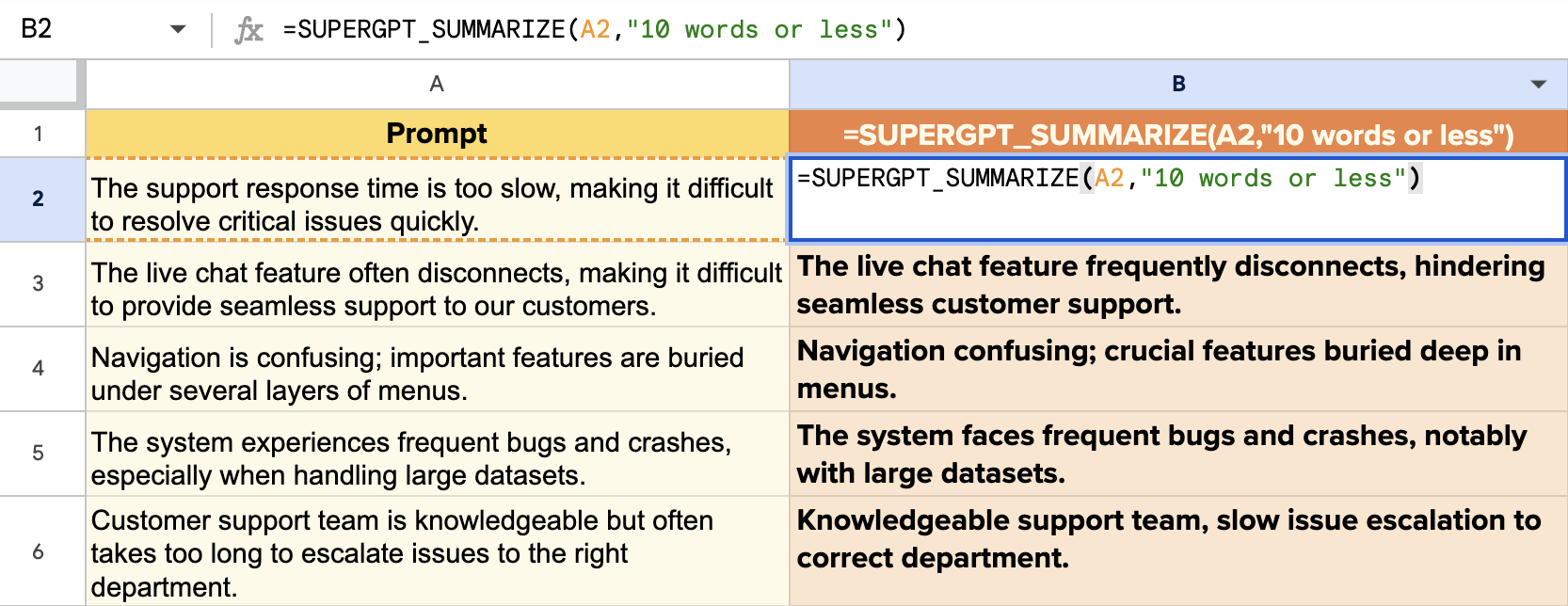 **How to use**
| Syntax | =SUPERGPT\_SUMMARIZE(text, \[format], \[temperature]) |
| ------------------ | ------------------------------------------------------------------------------------------------------------------------------------------------------------------------------------------------------------------------------------------------- |
| Copy/paste example | `=SUPERGPT_SUMMARIZE(A2:A10, “10 words or less”)` |
| Output | Returns a summary of the input text in the format specified. Note - If selecting to summarize a range of cells, the output will be a summary for each individual cell of the selected range, not a single summary of all cells included in range. |
**Parameters**
| Parameter | Definition |
| ---------------------- | ------------------------------------------------------------------------------------------------------------------------------------------------------------ |
| text (cannot be empty) | Input text to summarize.
**How to use**
| Syntax | =SUPERGPT\_SUMMARIZE(text, \[format], \[temperature]) |
| ------------------ | ------------------------------------------------------------------------------------------------------------------------------------------------------------------------------------------------------------------------------------------------- |
| Copy/paste example | `=SUPERGPT_SUMMARIZE(A2:A10, “10 words or less”)` |
| Output | Returns a summary of the input text in the format specified. Note - If selecting to summarize a range of cells, the output will be a summary for each individual cell of the selected range, not a single summary of all cells included in range. |
**Parameters**
| Parameter | Definition |
| ---------------------- | ------------------------------------------------------------------------------------------------------------------------------------------------------------ |
| text (cannot be empty) | Input text to summarize. 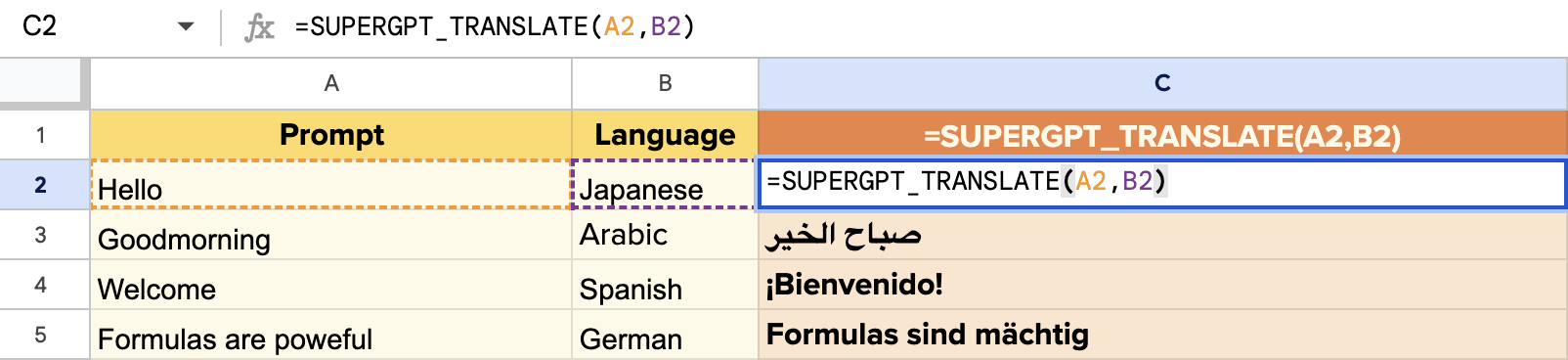 **How to use**
| Syntax | =SUPERGPT\_TRANSLATE(text, \[target\_language], \[source\_language], \[instructions],\[temperature]) |
| ------------------ | ---------------------------------------------------------------------------------------------------- |
| Copy/paste example | `=SUPERGPT_TRANSLATE("Cool off with our delicious treats!", "spanish")` |
| Output | The requested translation in a single cell |
**Parameters**
| Parameter | Definition |
| --------------------------- | ----------------------------------------------------------------------------------------------------------------------------------------------------------------------------- |
| text (cannot be empty) | Input text to translate.
**How to use**
| Syntax | =SUPERGPT\_TRANSLATE(text, \[target\_language], \[source\_language], \[instructions],\[temperature]) |
| ------------------ | ---------------------------------------------------------------------------------------------------- |
| Copy/paste example | `=SUPERGPT_TRANSLATE("Cool off with our delicious treats!", "spanish")` |
| Output | The requested translation in a single cell |
**Parameters**
| Parameter | Definition |
| --------------------------- | ----------------------------------------------------------------------------------------------------------------------------------------------------------------------------- |
| text (cannot be empty) | Input text to translate.